
AI workflow automation, with people in control.
Audmai FlowVerse coordinates multi-step business processes across AI, connected tools, conversations, and human approvals. It is the workflow layer: it moves work between systems while preserving execution context and visibility.
Prefer email? hello@audmai.com. Requests begin a conversation, not instant production activation.
Build the process your team actually runs
Start with an enquiry, an application event, a schedule, or a webhook. In the visual builder, connect modules, configure their inputs, and give each branch a deliberate outcome. Select a node to inspect its configuration rather than hide the process inside a single prompt.
FlowVerse brings AI processing, connected tools, conditions, and human approval into the same execution context. Your CRM or ATS stays the source of business records; the workflow coordinates the work around it. Templates provide a starting point, while versioned definitions and deployments separate authoring from activation.
The AI Conversational Agent is a FlowVerse capability for customer conversations across WhatsApp, Telegram, and email. Configure RAG knowledge, a business-specific system prompt, guardrails, and authorized actions within FlowVerse; CRM can supply connected records without owning the agent.
The AI Voice Agent brings spoken customer conversations into FlowVerse. Once deployed, connect it through a browser or phone for business-specific inbound or outbound calls, with Indian-language support and real-time code-switching.
- Compose and inspect nodes in the visual builder
- Connect authorized provider accounts and supported tools
- Review individual runs, step outcomes, and approval decisions
 Open full-size screenshot
 Example: one enquiry, one reviewed follow-up
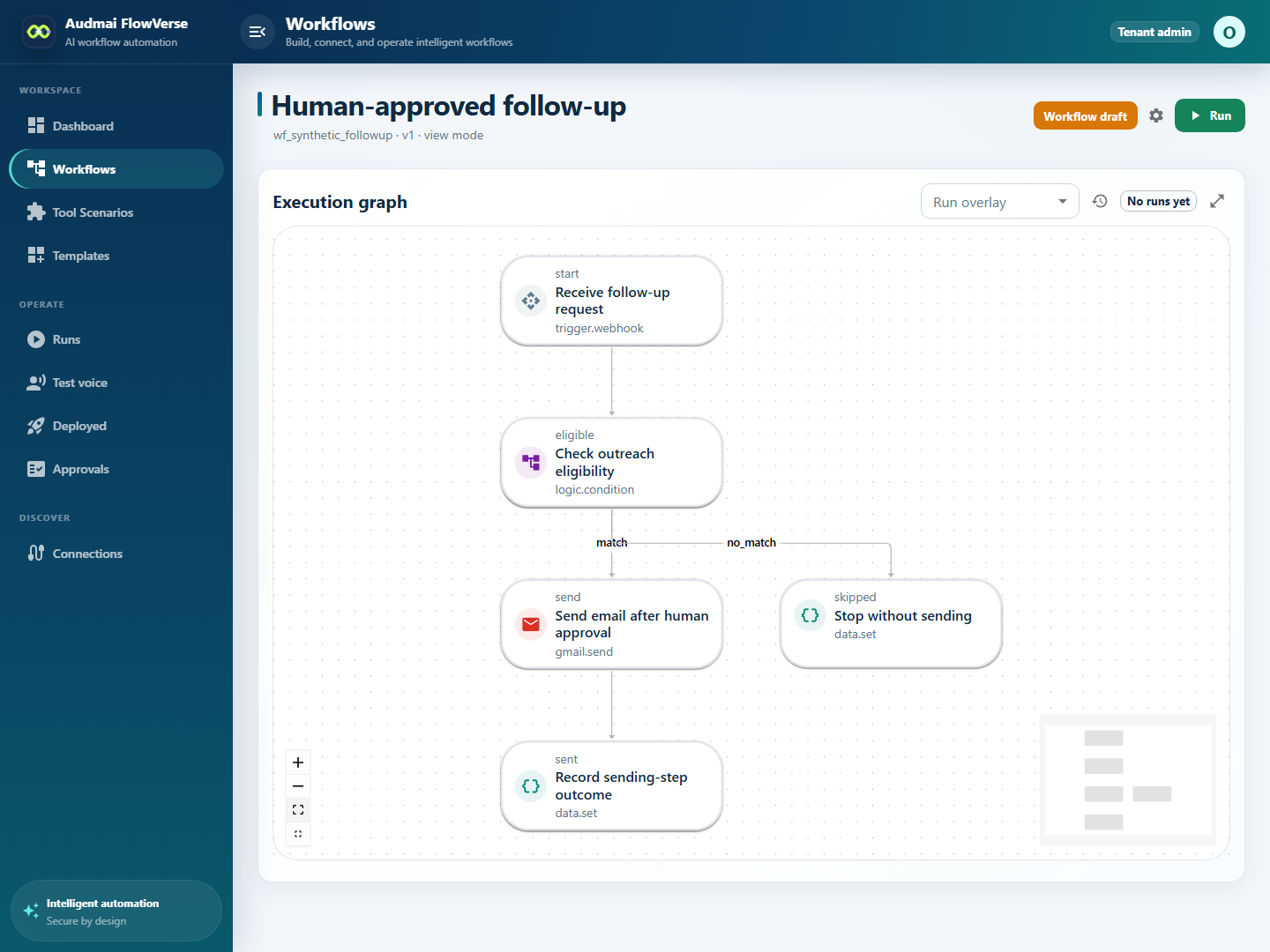
An operations team wants to follow up on an existing enquiry without automatically contacting every stored lead. The example below uses a fixed email, one recipient per run, and the existing email approval gate. AI drafting is optional, not a prerequisite for this workflow.
This is a configuration example, not an installed template or a live automation. The accompanying guide explains the sample payload, approval settings, and checks needed before enabling a real sending path.
Receive the request
A webhook supplies the enquiry reference and recipient context from an authorized source. Check current eligibility against the source records; client-supplied flags alone are not permission to contact someone.
Route the eligibility decision
A Condition node follows the match branch for an eligible request and the no_match branch to an ineligible outcome. The ineligible branch has no sending node.
Pause before email
A Gmail Send email node uses a connected account, recipient, subject, and body. Workflow approval settings require manual review of email.send, so execution pauses before the provider call.
Resolve and inspect
An authorized reviewer checks the proposed action and resolves the approval. After approval, resume the run when applicable and inspect the sending step. A rejected approval keeps sending blocked.
See what happened, not just what was intended
Run details show status, a step timeline, available inputs and outputs, and execution events. Use these to distinguish waiting for approval, an ineligible branch, a provider failure, and a completed sending step.
A successful sending step is not proof of inbox delivery, a reply, or a sale. Record those later outcomes from the corresponding system. If a provider response is uncertain, investigate before retrying; replaying an external action can duplicate it.
Before activation, agree the workflow owner, provider permissions, approval policy, safe test records, and handling of changed preferences. Healthcare and other regulated data have additional readiness requirements. Connections and provider logos do not imply unrestricted access or an official partnership.
- Trace each run back to its initiating event
- Separate approval and execution from eventual business outcomes
- Validate failure, cancellation, and duplicate-event paths before launch
Questions about
Audmai FlowVerse.
Is FlowVerse a CRM?
No. FlowVerse coordinates processes and integrations. Audmai CRM provides dedicated customer and operational workspaces. They can be connected, but serve different roles.
Can AI execute every action without review?
No. Tool access and approval requirements depend on the configured workflow and its permissions. Human review and handoff can remain part of the process.
Are the screenshots from the real application?
Yes. They show the current FlowVerse interface rendered with synthetic sample data. They do not show a customer deployment, verified backend execution, or a sent email.
Does the follow-up example run when I visit this page?
No. This page explains a configuration example. Reading it or opening a screenshot does not create a workflow, authorize a connection, or contact a recipient.
Give the next action
a clear owner.
Tell us about your team, existing systems, and the workflow you want to connect.
Early-access requests. A conversation with our team.