
How can teams automate follow-up in FlowVerse with human approval?
In Audmai FlowVerse, check communication eligibility, prepare a specific message, require approval before the sending action, and inspect the actual result. This walkthrough uses a webhook, an eligibility condition, and a manually approved Gmail send for one enquiry and one recipient per run.
Prefer email? hello@audmai.com. Requests begin a conversation, not instant production activation.
Prepare the owner, connection, and sample input
Use this example when a team wants to review a fixed follow-up email before it goes out. It documents existing modules and approval settings; it does not install a template or enable outreach. Start with a draft and synthetic records, not a production contact list.
Human-approved follow-up belongs to FlowVerse: its workflow execution, approval queue, and run history own this process. A CRM may supply record context, but this is not a standalone Audmai CRM approval feature.
The webhook body below is an example data contract. The initiating system must validate the enquiry identity and current communication preferences against authoritative records. A caller setting email_eligible to true is not itself consent or authorization.
Use example.com addresses only as fixtures. To test a real provider call later, substitute an explicitly authorized test inbox and a reviewed connection; a synthetic payload is not permission to send.
- A workflow owner with permission to configure and run the draft
- An authorized reviewer with approval-resolution access
- A tenant-scoped Gmail connection with the required sending access
- A verified initiating source and an agreed recipient-eligibility policy
- A fixed, reviewed subject and body; one recipient per run
Example webhook body - synthetic data, not a send request
{
  "enquiry_id": "enquiry_sample_001",
  "email": "alex@example.com",
  "email_eligible": true,
  "opted_out": false
}Configure the branches and the manual email gate
In the draft workflow, build the five-node example described below. Use the workflow properties to configure Approvals. The manual mode must also name email.send in required_for; changing mode alone does not gate every node.
The approval belongs to the email.send action within the run, not to a separate review for each recipient. Keep this example to one recipient per run. Review the recipient, fixed message, workflow version, and eligibility evidence before resolving the decision; the queue alone is not a full message preview.
Add Webhook Trigger
Name the node start. Map the initiating event body to the documented enquiry and recipient fields. Require JSON booleans for the eligibility flags and reject wrong types at the initiating boundary; a condition is not schema validation. Keep the endpoint within the authorized trigger setup.
Add Condition (if)
For the validated flags, check that email_eligible is true and opted_out is false. Connect match to the sending node and no_match to an Edit Fields (Set) node recording outcome: ineligible. Missing or uncertain eligibility must not enter the sending branch.
Add Gmail Send email
Select the reviewed Gmail connection. For To, use @items('start')?[0]?['json']?['body']?['email']. Set a fixed subject and body, such as an invitation to reply about the existing enquiry. Do not add unsupported commitments or sensitive record details.
Require manual review
Set the Approvals configuration shown below and replace operations-reviewer with the appropriate reviewer identity for your workspace. Confirm the run enters awaiting_approval before any provider call.
Record the sending-step result
Connect the sending node to an Edit Fields (Set) node recording outcome: send_step_completed. This summarizes that execution step; it is not a CRM update, delivery receipt, reply, or commercial conversion.
Workflow properties - Approvals configuration
{
"mode": "manual",
"required_for": [
"email.send"
],
"approver": "operations-reviewer"
} Open full-size screenshot
 Test the blocked paths, then verify the outcome
First use isolated fixtures with provider calls intercepted. Before enabling real actions, repeat the approved paths with an authorized test inbox and inspect the run, step output, and provider result. The website screenshots use intercepted synthetic responses and do not establish backend execution.
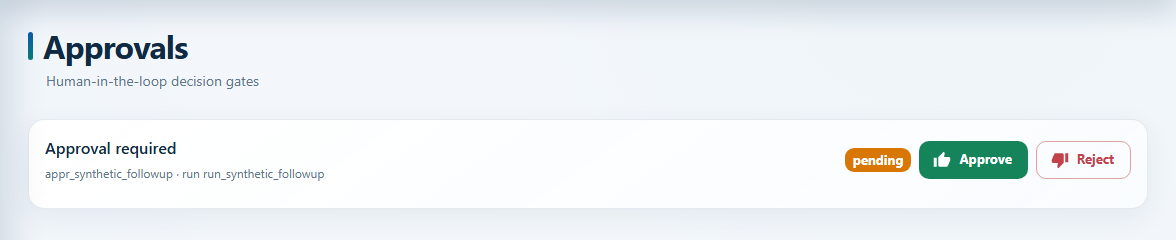
For a pending run, find its approval in Approvals and check the action context separately. Approve only the reviewed scope, then resume from the run when applicable. Reject keeps the send blocked; cancel or handle that run according to your process rather than count it as sent.
If preferences or the message change while approval is pending, cancel the run and start a freshly checked request. This minimal example does not automatically refresh source preferences after approval. A human decision does not override an opt-out.
A provider timeout can leave delivery uncertain. Check provider evidence before retrying. A new run or replay is not automatically safe from duplicate email, and a completed sending step does not prove inbox delivery or a reply.
| Scenario | Expected behavior | Evidence to inspect |
|---|---|---|
| Eligible request, still pending | Run waits for approval | Pending approval and no sending-provider call |
| Approved request, then resumed | Sending path may execute | Approval decision, sending-step result, and provider response |
| Rejected request | Sending remains blocked | Rejected approval; no sending-provider call |
| Opt-out or missing eligibility | Ineligible branch only | Condition takes no_match and records ineligible |
| Connection missing or unauthorized | Blocked or failed; not sent | Explicit dependency/permission error in the run |
| Provider timeout or repeated event | Investigate before retrying | Provider receipt, run history, and trigger duplicate-handling policy |
Questions about
FlowVerse human-approved follow-up.
Is human-approved follow-up part of Audmai CRM?
No. It is a FlowVerse workflow capability. Audmai CRM can supply connected record context, but the approval gate, execution, and run history belong to FlowVerse.
Does human approval remove the need for consent checks?
No. Approval of an action and communication eligibility are separate requirements. Both need to be satisfied.
Is every follow-up a message?
No. Follow-up may be an internal task, a configured message, or an approved call. These actions have distinct permissions and outcomes.
Is setting approval mode to manual enough?
No. In this example, required_for must include email.send. The action gate is configured explicitly; manual mode is not a blanket approval gate for every integration or tool.
Does approval automatically recheck current preferences?
Not in this minimal example. If preferences change while waiting, cancel the run and start a freshly validated request. Approval is not permission to ignore an opt-out.
Can I use the same setup for WhatsApp or healthcare reminders?
Not unchanged. The example is a Gmail email action. Other channels need their supported action, permission and approval path; healthcare also needs the applicable patient-data and activation checks.
Give the next action
a clear owner.
Tell us about your team, existing systems, and the workflow you want to connect.
Early-access requests. A conversation with our team.