
Customer context your team can act on.
Audmai CRM brings customer and operational records into dedicated healthcare, dental, and real-estate workspaces. Keep patient visits or property enquiries connected to the next staff action. CRM owns these records; FlowVerse separately owns connected workflow execution and human-approved follow-up.
Prefer email? hello@audmai.com. Requests begin a conversation, not instant production activation.
Healthcare: patient context to an owned next action
A receptionist needs to understand who is visiting, which appointment is relevant, and what the team still needs to do. The healthcare workspace keeps patient context, appointment details, and staff follow-up together instead of treating a saved contact as a completed conversation.
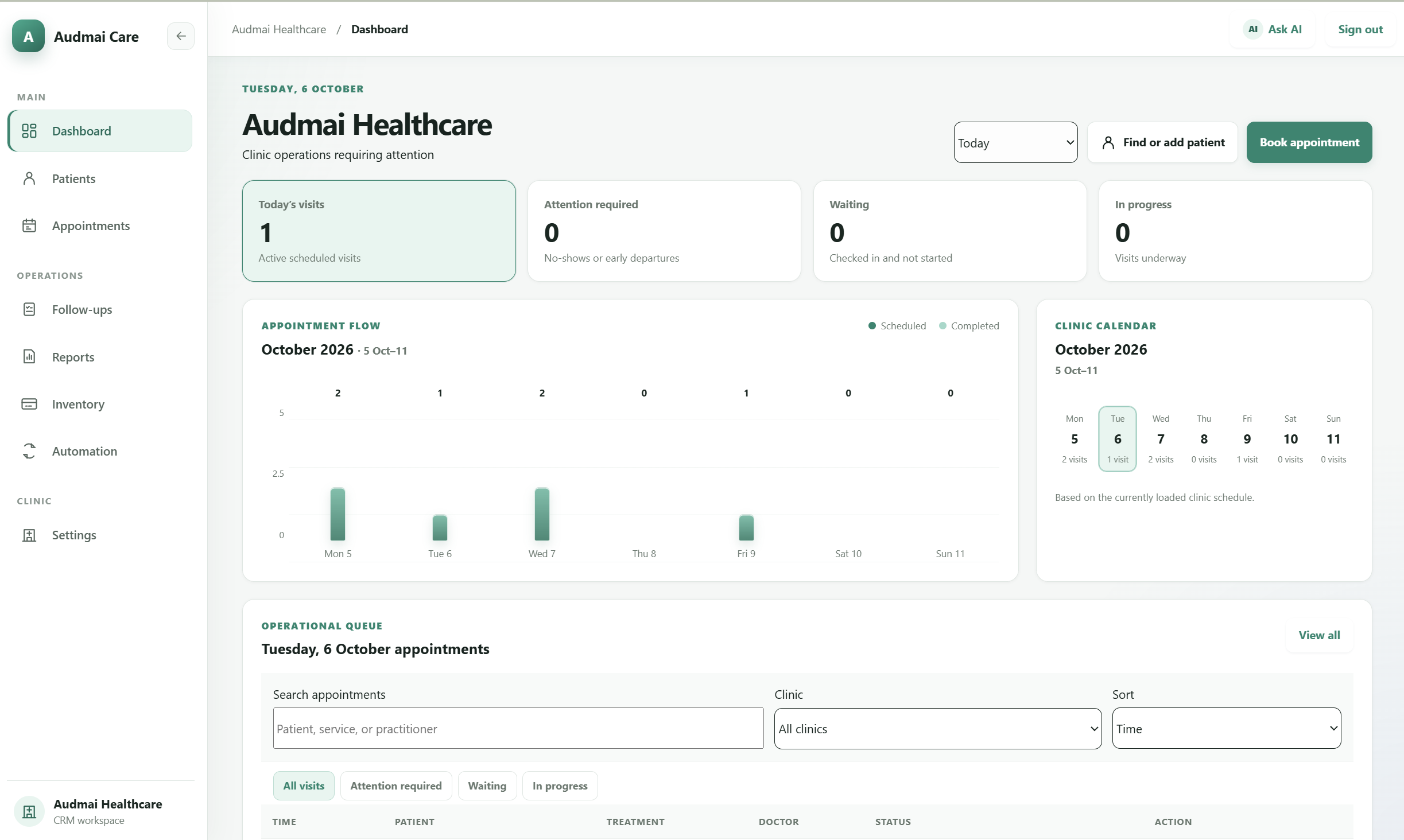
The supplied Audmai Care dashboard shows today's visits, attention required, waiting and in-progress counts, appointment flow, a clinic calendar, and the operational queue. It illustrates the healthcare workspace; displayed counts are not independently verified patient or clinical outcomes.
Open the correct patient context
Use the patient identity and contact context to select the intended record. Check shared contact details and communication preferences rather than assume a phone number uniquely identifies someone. The record keeps patient context; opening it does not contact the patient.
Keep the appointment and visit distinct
Work with the patient, location, service, clinician, and time in the appointment record. Booking status and visit progression are separate facts: a confirmed appointment is not a completed consultation.
Assign and record the staff follow-up
Give the next internal action an owner, due time, and status. Record the actual outcome, such as a reached patient or a reschedule request. Creating a task does not send a reminder or complete a callback.
 Open full-size screenshot
 Dental: case and visit context to material visibility
Dental teams need more than generic patient terminology. The dedicated workspace adds case, visit, treatment-workflow, and inventory context so authorized staff can follow the work around a patient and the materials used by the practice.
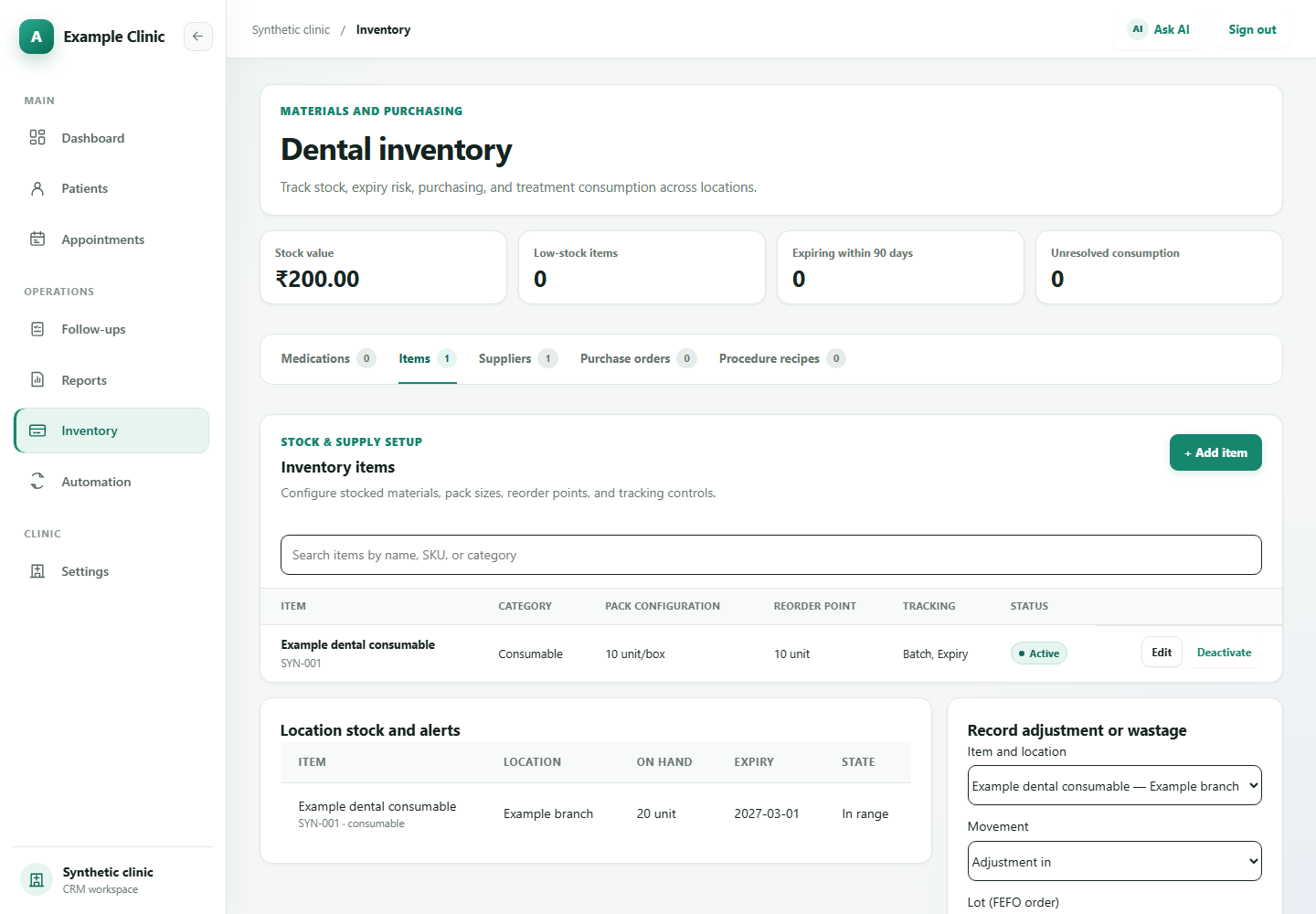
The inventory example below shows a synthetic consumable, its pack configuration, batch and expiry tracking, and branch stock. It illustrates the existing inventory workspace, not a performed procedure, stock transaction, or customer purchasing result.
Bring the patient and case together
Open the relevant patient case with its purpose, status, location, and responsible clinician context. Keep the appointment or visit associated with the intended case rather than recreate the patient history at each interaction.
Maintain the treatment and visit records
Use the dental treatment workflow to organize plan and encounter context. A plan is not proof of performed treatment, and a completed appointment is not an AI-generated clinical decision. Qualified clinicians remain responsible for diagnosis, prescribing, and treatment.
Track stock and recorded material use
Review items, suppliers, branch stock, batches, expiry, and purchasing in Inventory. Authorized staff confirm material use for performed treatment; a proposed treatment plan is not a completed stock movement. Record exceptions and reconcile receipts separately.
 Open full-size screenshot
 Real estate: enquiry to deal context and the next task
A property enquiry has its own requirements, property and unit context, proposals, deals, and meetings. Audmai CRM provides a standalone real-estate domain rather than reusing a renamed patient or clinical workspace.
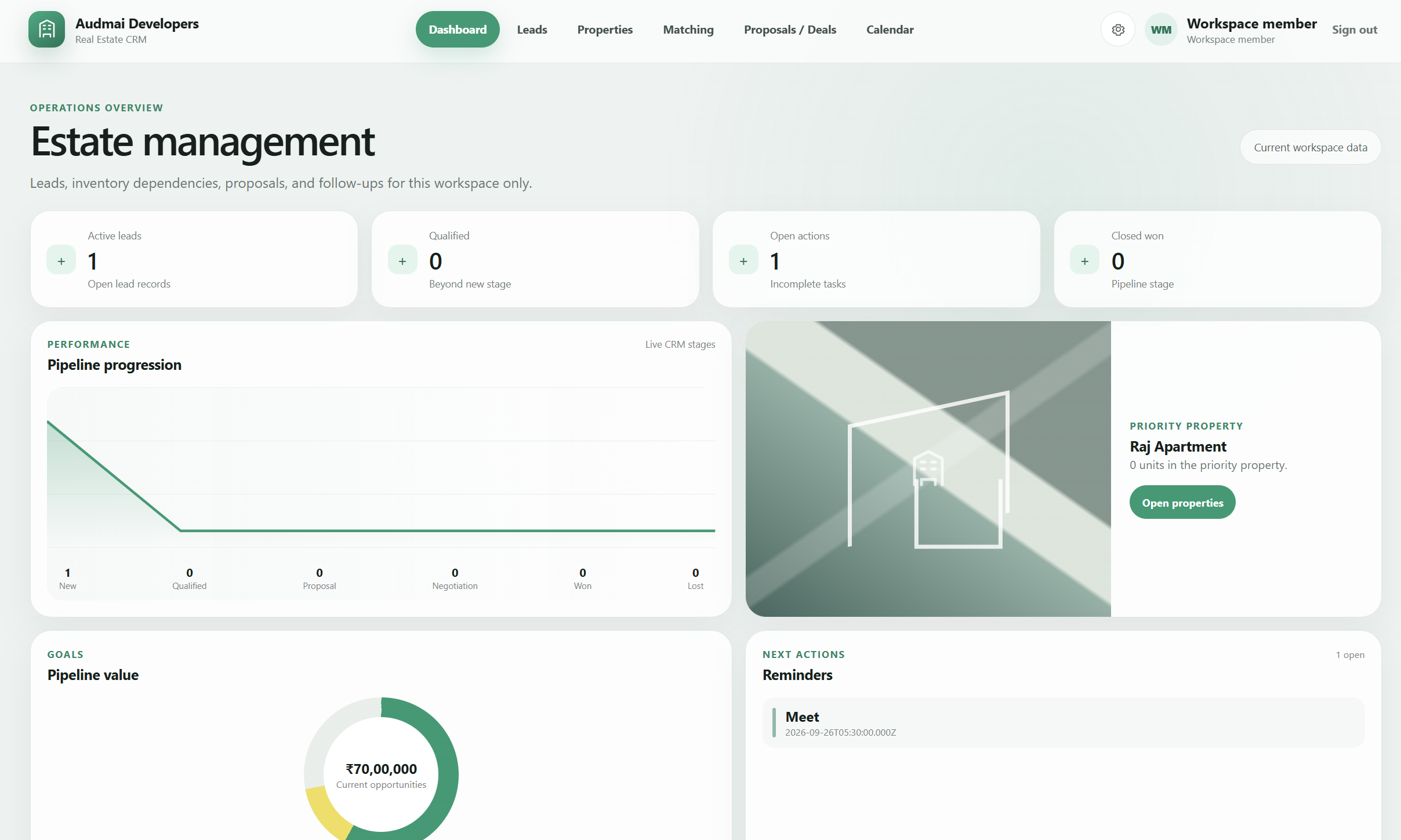
The supplied Audmai Developers dashboard shows active leads, qualification and open-action counts, pipeline progression, priority property context, pipeline value, and reminders. These views organize workspace records; displayed values are not independently verified property valuations, realized revenue, or completed sales.
Across these workspaces, role-aware access and the enabled release determine available actions. Real patient processing requires the applicable healthcare-data readiness checks. External messages, calls, and human-approved follow-up require a separately configured FlowVerse path; they are not implied by CRM task creation.
Capture the enquiry and its owner
Keep the lead identity, enquiry source, current stage, requirements, and responsible staff member together. A qualified stage is recorded business state, not a guaranteed purchase or independently verified customer intent.
Review requirements against property context
Work with location, budget, property type, and unit information to prepare the next discussion. Staff should verify availability and commitments; the presence of a property record does not promise unrestricted listings synchronization or automatic valuation.
Link the proposal or deal
Associate the prospective deal with its lead and stage so the team can follow the opportunity. Record the actual progression instead of treating a proposal or a pipeline value as realized revenue.
Give the next task a clear due action
Use tasks and meeting context to organize a shortlist discussion or property visit. Record completion separately from any external outreach. Sending an email, WhatsApp message, or making a call needs its own authorized execution path.
 Open full-size screenshot
 Questions about
Audmai CRM.
Does Audmai CRM replace our recruiting ATS?
No. Recruitment is an ATS-connected FlowVerse workflow use case, not an Audmai recruitment CRM or an ATS replacement.
Are CRM AI agents always enabled?
No. AI and automation capabilities depend on configuration, permissions, and activation. Discuss the approved scope for your workspace rather than assume every agent is enabled.
Does creating a CRM task send a message or make a call?
No. An internal task records work for staff. External messaging and calls require the corresponding authorized channel and execution path; a saved task is not delivery evidence.
Where does human-approved follow-up run?
In Audmai FlowVerse, not as a standalone CRM workflow feature. CRM can supply connected record context, while FlowVerse owns that approval gate, execution, and run history.
Are the CRM screenshots real customer records?
The healthcare and real-estate dashboard screenshots were supplied for this page; their capture data provenance has not been independently verified. The healthcare image shows aggregate counts without visible patient details. The dental screenshot uses intercepted synthetic fixtures. These screenshots do not establish verified customer outcomes or production healthcare readiness.
Can the CRM make clinical decisions?
No autonomous diagnosis, prescribing, or treatment decision is claimed. The dental and healthcare workspaces organize records and operations; clinical responsibility and real-data readiness remain with the appropriate care team and approved environment.
Give the next action
a clear owner.
Tell us about your team, existing systems, and the workflow you want to connect.
Early-access requests. A conversation with our team.